Formaldehyde Monitoring with Home Assistant and TimescaleDB
This recipe demonstrates how to integrate a WZ-S Formaldehyde (CH2O) detection module into a modern monitoring stack. By utilizing the CycBox Lua engine, we parse the sensor's proprietary 9-byte UART protocol, publish real-time state to the Home Assistant REST API, archive high-resolution data in a TimescaleDB hypertable, and manage email alerts for air quality threshold breaches.
What this recipe does
This integration transforms a raw serial sensor into a managed environmental monitoring node:
- Protocol Management: Parses 9-byte fixed-length frames, including a custom LRC-variant checksum validation.
- Operating Mode Control: Automatically switches the sensor from its default "Active Upload" mode to " Question-Answer" (QA) mode for controlled polling.
- Multi-Destination Routing:
- Home Assistant: Updates a
sensor.wz_s_formaldehydeentity with ppb and µg/m³ values. - TimescaleDB: Inserts asynchronous records into a hypertable for long-term trend analysis.
- SMTP Alerts: Triggers high-priority email notifications when formaldehyde levels exceed 80 ppb, with recovery notifications at 50 ppb.
- Home Assistant: Updates a
- Hysteresis Logic: Prevents alert fatigue by requiring a significant drop in concentration before clearing an alarm state.
End-to-end data flow
The following flowchart describes the propagation of a single measurement from the fuel-cell sensor to the visualization and alerting layers.
Device and wire protocol
The WZ-S Formaldehyde Detection Module is a fuel-cell based sensor providing standardized digital output via UART.
- Electrical Interface: UART at 9600 baud, 8N1. Logic levels are 3.3V, though the supply voltage (Vin) requires 5V to 7V.
- Physical Layer: The sensor uses a 9-byte fixed-length frame. According to the datasheet, it requires a warm-up period of less than 3 minutes for accurate readings.
The table below describes the 9-byte frame structure for the sensor's response in QA Mode (Command 0x86).
| Byte | Field | Type | Unit | Description |
|---|---|---|---|---|
| 0 | Start Bit | uint8 | - | Static 0xFF |
| 1 | Command | uint8 | - | 0x86 (QA Response) |
| 2 | High Conc | uint8 | µg/m³ | High byte of concentration |
| 3 | Low Conc | uint8 | µg/m³ | Low byte of concentration |
| 4-5 | Reserved | - | - | Static 0x00 |
| 6 | High Conc | uint8 | ppb | High byte of concentration |
| 7 | Low Conc | uint8 | ppb | Low byte of concentration |
| 8 | Checksum | uint8 | - | (NOT(Sum(Bytes 1..7))) + 1 |
CycBox configuration
The CycBox is configured to handle the framing layer automatically, allowing the Lua script to focus on the 7-byte payload (excluding the 0xFF prefix and the checksum).
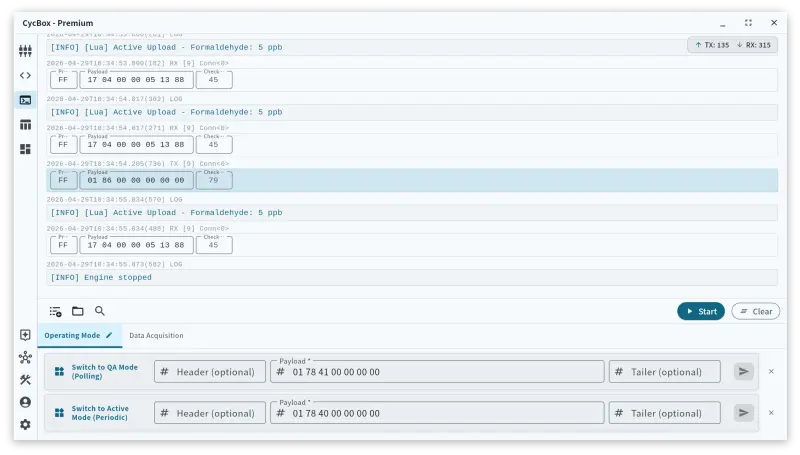
Connection: Serial Port
The serial connection targets the local UART port where the sensor is attached.
{
  "serial_port_transport": {
    "serial_port_transport_port": "/dev/ttyACM0",
    "serial_port_transport_baud_rate": 9600,
    "serial_port_transport_data_bits": 8,
    "serial_port_transport_parity": "none",
    "serial_port_transport_stop_bits": "1"
  }
}
Codec: Frame Codec
The frame_codec is tuned to the WZ-S proprietary format. By defining the prefix and the checksum algorithm, the engine
discards malformed frames before they reach the Lua environment.
{
  "frame_codec": {
    "frame_codec_length_mode": "fixed",
    "frame_codec_prefix": "FF",
    "frame_codec_fixed_payload_size": 7,
    "frame_codec_checksum_algo": "lrc",
    "frame_codec_checksum_scope": "payload"
  }
}
Lua pipeline walkthrough
The Lua script manages the sensor lifecycle and data distribution.
--
-- TimescaleDB Setup (run once before starting the script):
--   CREATE TABLE sensor_readings (
--       time                TIMESTAMPTZ NOT NULL DEFAULT NOW(),
--       sensor              TEXT        NOT NULL,
--       formaldehyde_ppb    INTEGER,
--       formaldehyde_ugm3   INTEGER
--   );
--   SELECT create_hypertable('sensor_readings', 'time', if_not_exists => TRUE);
--   -- Optional: add an index for fast per-sensor queries
--   CREATE INDEX ON sensor_readings (sensor, time DESC);

local HA_URL = get_env("HA_URL") or "http://localhost:8123/api/states/sensor.wz_s_formaldehyde"
local HA_TOKEN = get_env("HA_TOKEN") or "YOUR_LONG_LIVED_ACCESS_TOKEN"
local TS_CONN = get_env("TS_CONN") or "host=localhost port=15432 dbname=cycbox user=postgres password=xxxxxx sslmode=disable"

local POLL_INTERVAL = 5000 -- Poll every 5 seconds
local timer_counter = 0
local db_connected = false

-- Alarm Config
local ALARM_HIGH_PPB = 80
local ALARM_LOW_PPB = 50

local SMTP_CONFIG = {
    server   = "smtp.gmail.com",
    port     = 587,
    tls      = "starttls",
    username = "your-email@gmail.com",
    password = "your-app-password",
    from     = "your-email@gmail.com",
    to       = "recipient@example.com",
}

local is_ppb_high = false

local function send_alarm_email(ppb_val, state)
    local subject, msg
    if state == "HIGH" then
        subject = string.format("ALARM: Formaldehyde High (%d ppb)", ppb_val)
        msg = string.format("Formaldehyde level has exceeded the high threshold (%d ppb). Current value: %d ppb.", ALARM_HIGH_PPB, ppb_val)
        log("warn", msg)
    else
        subject = string.format("RECOVERY: Formaldehyde Normal (%d ppb)", ppb_val)
        msg = string.format("Formaldehyde level has dropped below the low threshold (%d ppb). Current value: %d ppb.", ALARM_LOW_PPB, ppb_val)
        log("info", msg)
    end

    smtp_send_async({
        server   = SMTP_CONFIG.server,
        port     = SMTP_CONFIG.port,
        tls      = SMTP_CONFIG.tls,
        username = SMTP_CONFIG.username,
        password = SMTP_CONFIG.password,
        from     = SMTP_CONFIG.from,
        to       = SMTP_CONFIG.to,
        subject  = subject,
        text     = msg,
    })
end

function on_start()
    -- Connect to TimescaleDB
    local ok, err = timescaledb_connect(TS_CONN, 3)
    if ok then
        db_connected = true
        log("info", "Connected to TimescaleDB")
    else
        log("error", "TimescaleDB connection failed: " .. (err or "unknown"))
    end

    -- Switch to Question-Answer (QA) Mode
    -- The frame codec auto-appends 0xFF prefix and the 1-byte checksum.
    local qa_mode_cmd = string.char(0x01, 0x78, 0x41, 0x00, 0x00, 0x00, 0x00)
    send_after(qa_mode_cmd, 100, 0)
    log("info", "WZ-S script started. Switched to QA mode.")
end

function on_receive()
    -- Only process data from connection 0
    if message.connection_id ~= 0 then return false end
    -- The frame_codec auto-verifies the LRC checksum for us
    if not message.checksum_valid then return false end

    -- Payload excludes the 0xFF prefix and the 1-byte checksum tailer
    local payload = message.payload
    if not payload or #payload < 7 then return false end

    local cmd = string.byte(payload, 1)
    local ppb = nil
    local ugm3 = nil

    if cmd == 0x17 then
        -- Active Upload Mode data (handled just in case)
        ppb = string.byte(payload, 4) * 256 + string.byte(payload, 5)
        log("info", string.format("Active Upload - Formaldehyde: %d ppb", ppb))

    elseif cmd == 0x86 then
        -- Question-Answer Mode data response
        ugm3 = string.byte(payload, 2) * 256 + string.byte(payload, 3)
        ppb = string.byte(payload, 6) * 256 + string.byte(payload, 7)
        log("info", string.format("QA Read - Formaldehyde: %d ppb, %d ug/m3", ppb, ugm3))

    else
        -- Ignore Acknowledge messages (like 0x78) or unknown commands
        return false
    end

    -- Add parsed values to the message context
    if ppb then message:add_int_value("formaldehyde_ppb", ppb) end
    if ugm3 then message:add_int_value("formaldehyde_ugm3", ugm3) end

    if ppb then
        if ppb > ALARM_HIGH_PPB and not is_ppb_high then
            is_ppb_high = true
            send_alarm_email(ppb, "HIGH")
        elseif ppb <= ALARM_LOW_PPB and is_ppb_high then
            is_ppb_high = false
            send_alarm_email(ppb, "NORMAL")
        end

        -- Send values to Home Assistant via HTTP POST
        local ugm3_attr = ugm3 or 0
        local ha_body = string.format('{"state": %d, "attributes": {"unit_of_measurement": "ppb", "device_class": "volatile_organic_compounds", "ugm3": %d}}', ppb, ugm3_attr)
        local headers = {
            ["Authorization"] = "Bearer " .. HA_TOKEN,
            ["Content-Type"] = "application/json"
        }
        http_post(HA_URL, ha_body, headers)
    end

    -- Asynchronously insert into TimescaleDB
    if db_connected and ppb then
        local ugm3_val = ugm3 or 0
        timescaledb_insert_async("sensor_readings",
            {"sensor", "formaldehyde_ppb", "formaldehyde_ugm3"},
            {"wz_s", ppb, ugm3_val})
    end

    return true
end

function on_timer(now_ms)
    timer_counter = timer_counter + 100
    if timer_counter >= POLL_INTERVAL then
        timer_counter = 0

        -- Poll concentration (QA Mode Read request)
        -- The frame codec will append 0xFF and the LRC checksum.
        local read_cmd = string.char(0x01, 0x86, 0x00, 0x00, 0x00, 0x00, 0x00)
        send_after(read_cmd, 0, 0)
    end
end

function on_stop()
    if db_connected then
        timescaledb_disconnect()
    end
end
Downstream service contracts
Home Assistant
CycBox pushes data directly to the Home Assistant REST API.
- Endpoint:
/api/states/sensor.wz_s_formaldehyde - Auth: Bearer Token (Long-Lived Access Token).
- Payload Schema:
{
  "state": 12,
  "attributes": {
    "unit_of_measurement": "ppb",
    "device_class": "volatile_organic_compounds",
    "ugm3": 15
  }
}
TimescaleDB
The script expects a hypertable named sensor_readings.
The table below defines the schema for the formaldehyde monitoring database.
| Column | Data Type | Description |
|---|---|---|
time | TIMESTAMPTZ | Partitioning key (Primary time index) |
sensor | TEXT | Sensor identifier (e.g., 'wz_s') |
formaldehyde_ppb | INTEGER | Measured concentration in ppb |
formaldehyde_ugm3 | INTEGER | Measured concentration in µg/m³ |
SMTP (Email Alerts)
- Security: STARTTLS on Port 587.
- Frequency: Debounced by hysteresis logic; emails are only sent on state transitions (Breach vs. Recovery).
Alerting logic
To prevent "flapping" alerts when the concentration hovers near the threshold, the script implements a hysteresis window of 30 ppb.
| Event | Condition | Action |
|---|---|---|
| Alarm Trigger | Concentration > 80 ppb | Send "HIGH" alert email |
| Alarm Active | 50 ppb < Concentration < 80 ppb | No action (State maintained) |
| Recovery Trigger | Concentration ≤ 50 ppb | Send "NORMAL" recovery email |
Operational concerns
- Warm-up Inaccuracy: For the first 180 seconds after power-up, the sensor may report 0 ppb or erratic values. The
automation should include a
warm_uptag if used for critical safety decisions. - Environment: Avoid exposing the sensor to high concentrations of organic solvents (like alcohol or cleaning sprays), which can temporarily saturate the fuel cell and cause false positives.
- Database Connectivity: The script uses
timescaledb_insert_async. If the database is unreachable, records are queued in memory; ensure the CycBox host has sufficient RAM for outages.
Frequently asked questions
Why does my sensor return 0 ppb for several minutes?
The WZ-S uses a fuel-cell chemical reaction that requires a stabilization period. The datasheet specifies a warm-up time of up to 3 minutes before the internal electrolyte reaches the required sensitivity.
How do I verify the WZ-S checksum manually?
The checksum is an LRC variant. Sum bytes 1 through 7, perform a bitwise NOT, and add 1. If your sum is 0x86 and you perform NOT + 1, the result should match byte 8 of the frame.
What is the difference between QA and Active mode?
Active mode (0x40) pushes data every 1 second without prompting. QA mode (0x41) silences the sensor until a "Read Concentration" (0x86) command is received, allowing the host to control the polling rate and reduce bus traffic.
Gotchas and recommendations
- Logic Levels: Ensure you are using a 3.3V UART adapter. Connecting the TX/RX pins directly to 5V logic can damage the sensor's control board.
- Power Supply: While logic is 3.3V, the sensor requires at least 5V for its heater and electrochemical components. A weak power supply will lead to significant drift.
- Hysteresis Tuning: If your environment has a baseline of 40-60 ppb, consider raising the
ALARM_HIGH_PPBto 100 to avoid nuisance notifications.